What you'll learn
- Rule: whenever stage changes, update card details the same day. The board is only useful when freshness is high.
- Applications Board: Components and Usage
- Board-Level Components
- Application Card Components
Applications Board: Components and Usage
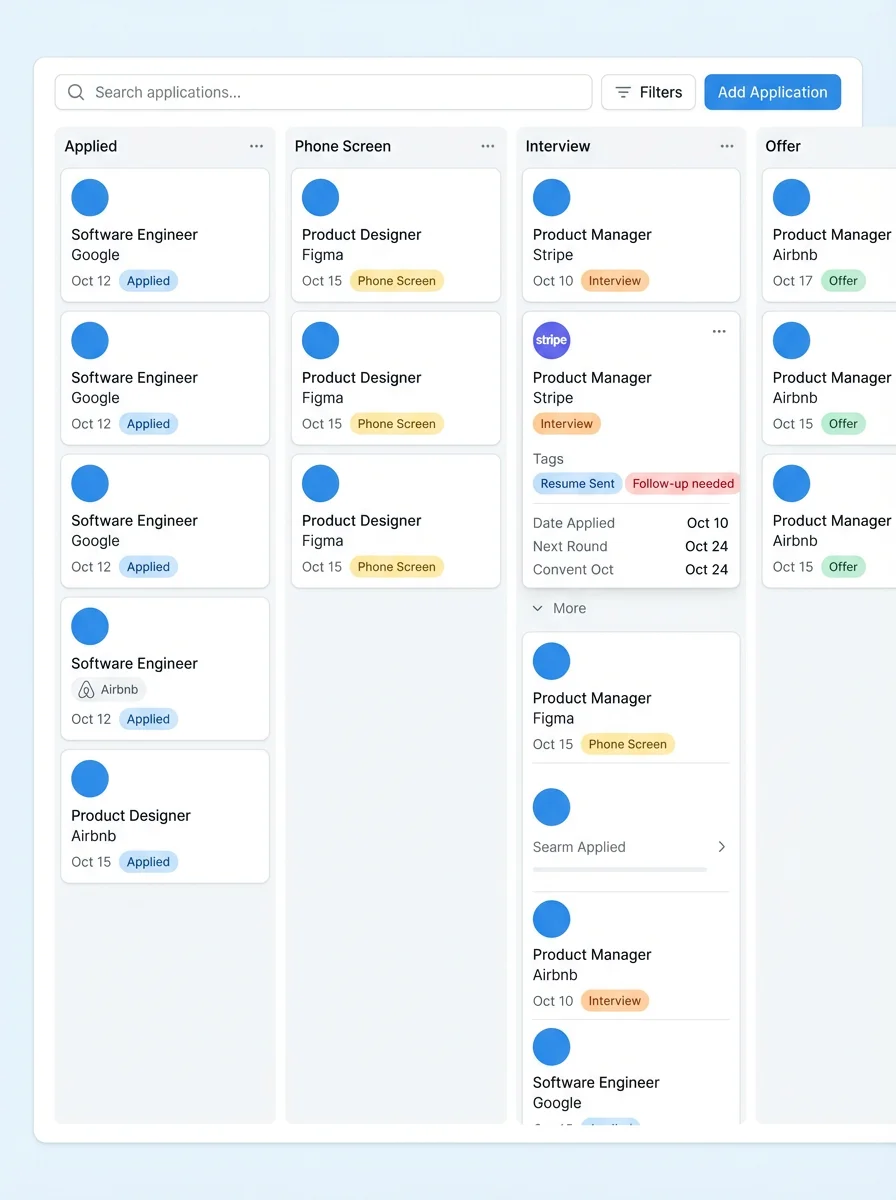
Board-Level Components
- Stage columns: Applied, interviewing, and outcome states.
- Add application action: Creates a new pipeline card.
- Filters/search: Focus on company, role, or stage.
Application Card Components
- Role + company: Primary identity fields.
- Status marker: Current stage in process.
- Dates and events: Upcoming interview/follow-up checkpoints.
- Linked resume: Tailored resume used for that specific application.
Card Detail Panel
- Job description: Source context for optimization and prep.
- Notes: Recruiter details, salary info, and next steps.
- Activities: Timeline of interactions and updates.
- Interview prep links: Jump directly to targeted interview practice.
Rule: whenever stage changes, update card details the same day. The board is only useful when freshness is high.